PaperPanda - Chrome Extension
What is PaperPanda - Chrome Extension?
✍: FYIcenter.com
 PaperPanda is a Chrome Extension that helps you download research papers.
You’ve probably run into this problem – you want to read a paper, but it’s locked behind a paywall.
Maybe you have access to it through your library or university, maybe it’s available to download for free through an open access portal, maybe the author uploaded a PDF to a website somewhere – but how are you going to find it?
PaperPanda is here to help!
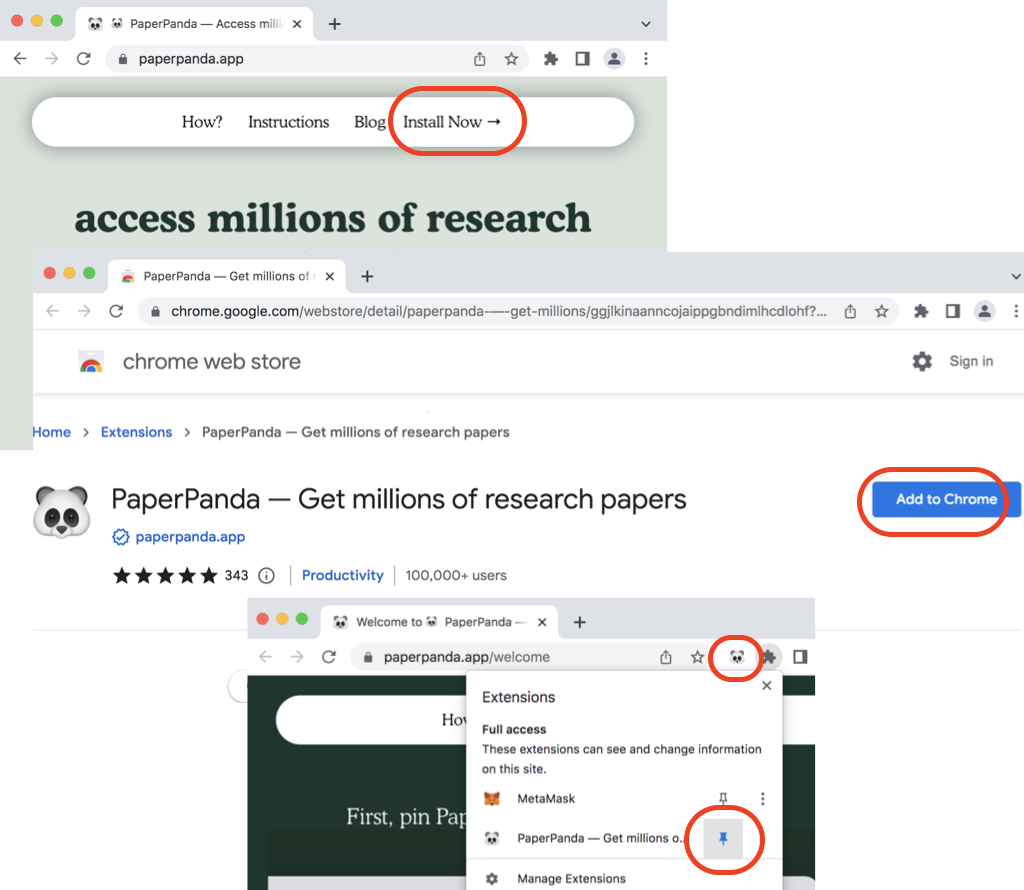
1. Open Chrome and go to https://paperpanda.app/.
2. Click "Install Now". You see PaperPanda in chrome web store.
3. Click "Add to Chrome". You see PaperPanda in your Chrome browser.
4. Click the "Extension" icon in Chrome menu. Click the "Pin" icon to put PaperPanda in the menu bar.
PaperPanda is ready to use.
⇒ Download Research Paper with PaperPanda
2022-10-06, ∼5443🔥, 0💬
Related Topics:

💬 2026-04-14 Hugo Lucas: 10.1001/jama.2026.2864
💬 2026-04-03 asd: 10.1016/S2665-9913(25)00316-9 Need this, please
