Structured Search on The Lens
Q
How to perform Structured Search on The Lens Website?
✍: FYIcenter.com
A
 You can follow these steps to perform Structured Search on The Lens Website.
1. Go to The Lens Website.
2. Click "Scholarly Works" above the search box to search for research articles.
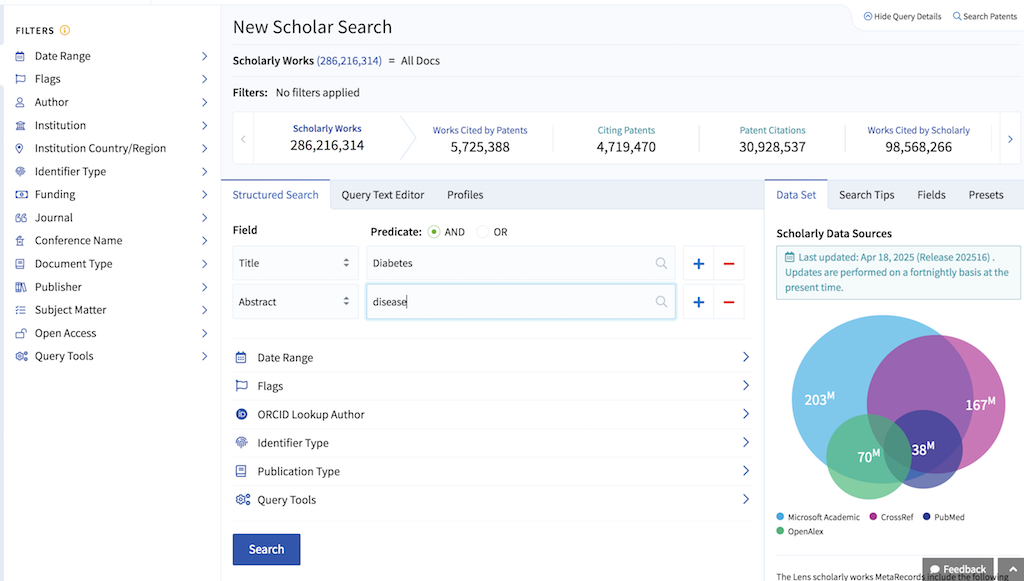
3. Click "Structured Search" link bellow the search box. You see the search page displayed.
4. As the primary condition, select the "Title" field and enter "diabetes" as the search term.
5. Click the "+" icon to an another condition with "Abstract" field and "disease" term.
6. Click the "Search" button. You see search results displayed.
7. You can refine results with filter options on the left.
2025-05-07, ∼847🔥, 0💬
Related Topics:

